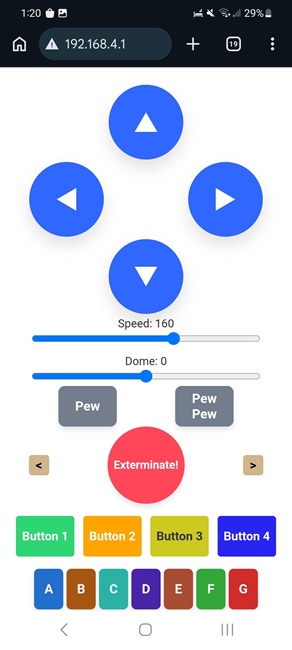
Control your MiniDalek with WiFi
from your phone or tablet


   Boot up your MiniDalek with latest wifi_minidalek_03c.zip  (10-26-2026)
   Put the 03-wifiAudio folder on your SD card wifi-minidalek audio files

If you don't already have the default audio files in the 00 directory, you  can find  them here.
You may also need the settings files in the 10 directory, you  can find  them here.

   On your Cell phone or tablet to connect this access point:

ssid = "MiniDalek-RC"
password="12345678"

 goto http://192.168.4.1 on this network for control panel

=====================


The colored buttons at the bottom of the screen will cycle through the specified sound clips or music stored in the "03" folder of your SD card.

The greater than[>] will skip past the next sound.
The less than[<] will replay the last sound.  Press multiple times to go back/forward further.

 Button   Dalek  R2D2  Button  Dalek  R2D2
 Button1

 Button2

 Button3

 Button4

 210-219

 220-229

 230-239

 240-249

 040-044

 045-049

 050-054

 055-059

  ButtonA

  ButtonB

  ButtonC

  ButtonD

  ButtonE

  ButtonF

  ButtonG

 110-119

 120-129

 130-139

 140-149

 150-159

 160-169

 170-179


 060-064

 065-069

 070-074

 075-079

 080-084

 085-089

 090-094


We also have some "Buried Extra Features" (BEF codes).

Type these sequences in the bottom keys:

BEF311 - Toggle VOLUME MODE on and off. This mode lets you set the volume using the SPEED slider. VOLUME MODE cancels after 90 seconds.

BEF321 - Toggle between TWO WHEEL TURN MODE and ONE WHEEL TURN MODE.

BEF322 - Toggle between DALEK MODE and R2D2 MODE.

BEF323 - Toggle between 4 turning speeds (1, 2,3 and 4) Use this if Dalek stalls while turning on carpet or running with heavy cargo.